


Why crawl budget optimization matters in 2026
Every time Google visits your website, it has a finite number of pages it will crawl and a limited amount of time it will spend doing so. This is your crawl budget and if it is being wasted on low-value, duplicate, or broken pages, your most important content may never get crawled, indexed, or ranked.
For small websites with under 1,000 pages, crawl budget is rarely a concern. But for large websites, eCommerce stores, news portals, and enterprise sites with thousands of URLs, crawl budget optimization is one of the most impactful technical SEO strategies available. If Googlebot is crawling your login pages, session URLs, and infinite scroll parameters instead of your money pages, you have a serious crawl budget problem.
In the age of AI-powered search and generative engines, efficient crawling is even more critical. Search engines need to discover, process, and understand your content before they can surface it in any format, such as traditional results, featured snippets, or AI-generated answers. This complete guide to crawl budget optimization covers everything you need to know to help Google crawl your website more efficiently and intelligently.
What is crawl budget? a clear definition
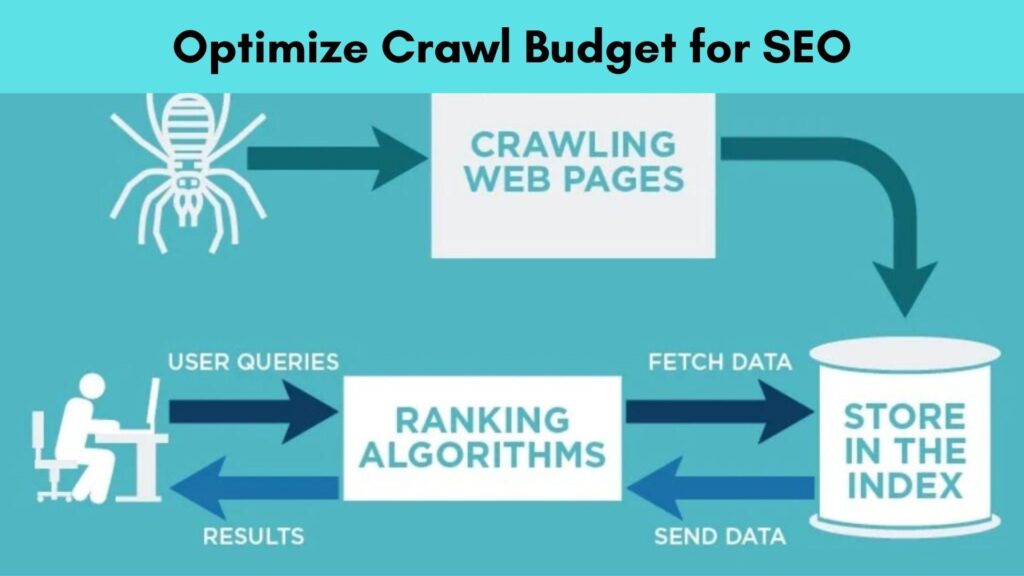
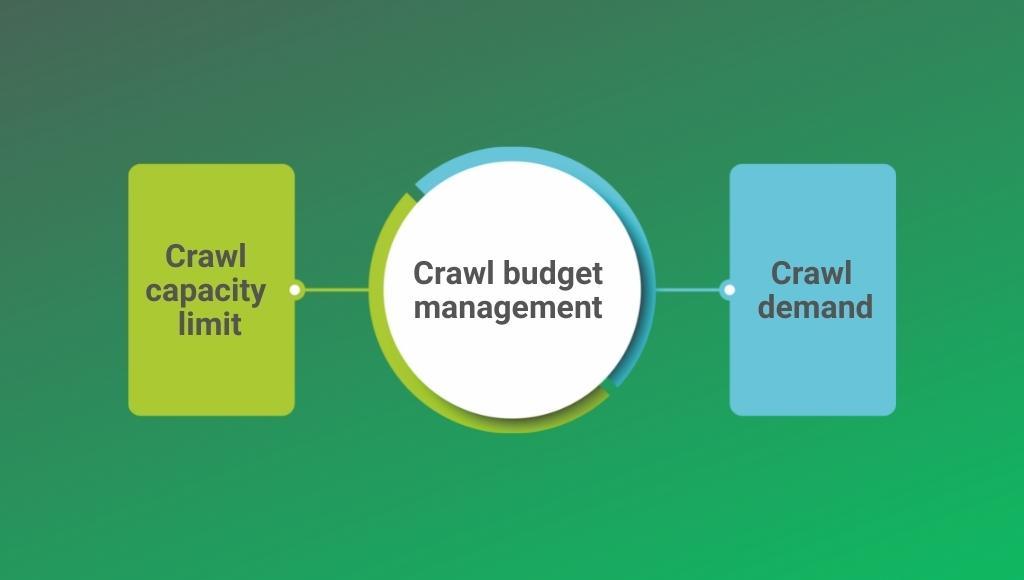
Crawl budget refers to the number of URLs Googlebot will crawl on your website within a given timeframe. It is determined by two key components that Google officially acknowledges:
| Component | What It Means |
|---|---|
| Crawl Rate Limit | The maximum speed at which Googlebot can crawl without overloading your server. It is influenced by your server response speed and can be manually adjusted in Google Search Console. |
| Crawl Demand | How much Google wants to crawl your pages, based on their popularity, PageRank, and freshness signals. High-authority and frequently updated pages attract higher crawl demand. |
Crawl budget = Crawl Rate Limit x Crawl Demand. In practical terms, Google gives each website a certain number of crawl slots. Every page on your site competes for those slots. Your job is to ensure that the pages Google crawls are the ones that actually matter for your SEO performance.
Who needs to worry about crawl budget?
Crawl budget optimization is most critical for:
- Large eCommerce websites with thousands of products, categories, and filter pages
- News and media websites that publish content at high frequency
- Enterprise websites with complex URL structures and faceted navigation
- Websites with frequent content updates that need rapid re-crawling
- Sites recovering from index bloat or a large number of low-quality pages
Even for medium-sized websites, understanding crawl budget helps you build a smarter site architecture and a more efficient internal linking strategy that guides Googlebot to your best content.
How Google determines your crawl budget
Google uses multiple signals to decide how much crawl budget to allocate to your website and which URLs to prioritize within that budget:
- Domain Authority & PageRank: High-authority websites naturally receive larger crawl budgets. Building quality backlinks and strong internal linking improves your crawl allocation.
- Server Response Speed: If your server responds slowly, Googlebot backs off to avoid overloading it. Page speed optimization directly improves crawl efficiency.
- Content Freshness: Pages that are updated frequently attract more crawl visits. Stale pages get crawled less often.
- Crawl History: Google tracks which pages it has crawled recently and whether they have changed. Unchanged pages get crawled less frequently over time.
- Popularity & Link Signals: Pages with more internal and external links pointing to them are prioritized for crawling.
- Sitemap Signals: URLs listed in your XML sitemap with correct last mod dates get prioritized for crawling.
- HTTP Status Codes: Redirects, 404 errors, and server errors consume crawl budget without producing indexable content.
What wastes crawl budget? (the 10 biggest crawl budget killers)
Before you optimize, you need to identify what is currently wasting your crawl budget. Here are the most common crawl budget killers:
- Duplicate Content & Thin Pages: Identical or near-identical pages (from URL parameters, session IDs, or printer-friendly versions) force Google to crawl the same content multiple times. Use canonical tags to consolidate duplicate URLs.
- Faceted Navigation & Filter URLs: eCommerce filter combinations (colour=red & size=L & brand=Nike) can generate thousands of duplicate, low-value URLs. These must be managed via robots.txt blocking, no index tags, or URL parameter handling in Google Search Console.
- Redirect Chains & Loops: Every redirect in a chain costs crawl budget. 301 redirect chains longer than 2-3 hops waste significant crawl capacity. Audit and fix these during a technical SEO audit.
- Broken Links & Soft 404s: Pages returning 404 or soft 404 errors still get crawled repeatedly. Identify and fix or remove these via your Google Search Console Guide.
- Low-Quality & Orphan Pages: Pages with no internal links (orphan pages) and pages with thin or duplicate content attract crawl budget with zero ranking benefit.
- URL Parameters Without Canonicalization: Tracking parameters (?utm_source=email), sorting parameters (?sort=price), and pagination parameters (?page=2) create thousands of unique URLs if not properly handled.
- Infinite Scroll & JavaScript-Rendered Content: Googlebot struggles with JavaScript-heavy infinite scroll implementations. This ties up crawl budget on content that may never be fully rendered. See our JavaScript SEO guide for solutions.
- Large Number of Paginated Pages: Pagination sequences that go 50+ pages deep (/page/48, /page/49, /page/50) dilute crawl budget. Consolidate thin paginated pages where possible.
- Non-Canonical Hreflang URLs: International websites with hreflang implementations must ensure all alternate URLs are valid and canonical to avoid budget waste.
- Crawlable Session & Login URLs: URLs like /cart, /checkout, /login, /account, and session-based URLs must be blocked in robots.txt immediately if they are not already.
How to check your crawl budget in Google search console
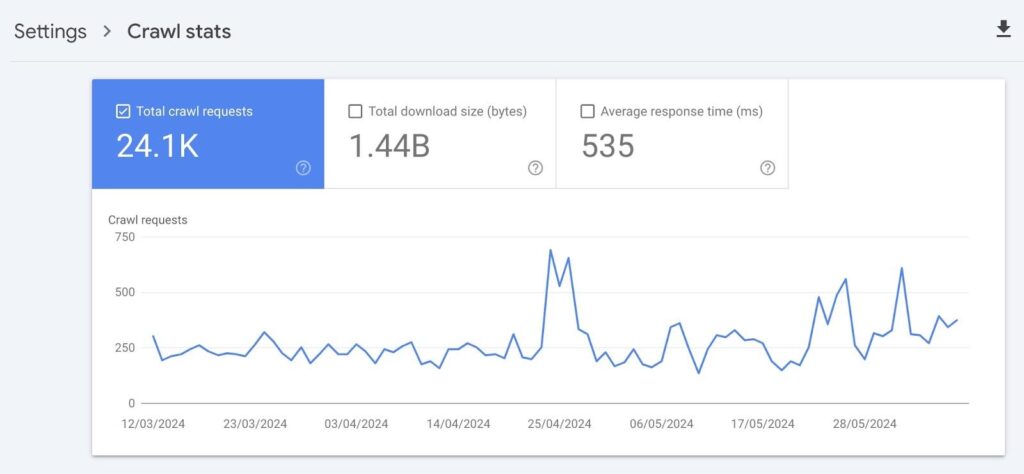
Your Google Search Console is the primary tool for diagnosing crawl budget issues. Here is exactly where to look:
1. Crawl stats report
Navigate to: Settings > Crawl Stats. This report shows you:
- Total crawl requests in the last 90 days
- Average crawl response time (server speed)
- Breakdown of crawled URLs by response code (200, 301, 404, etc.)
- Crawl requests by file type and purpose
Key insight: If you see a large percentage of 3xx (redirects) or 4xx (errors) in your crawl stats, Google is wasting significant budget on non-indexable URLs. Fix these immediately.
2. Url inspection tool
Use the URL Inspection tool to check the last crawl date for specific URLs. If important pages show old crawl dates, it signals a crawl budget problem prioritizing those pages.
3. Index coverage report
The Index Coverage report shows which pages are indexed, excluded, or have errors. A large number of “Excluded” URLs, especially those marked as “Crawled but not indexed,” “Discovered but not indexed,” or “Duplicate without canonical” indicate crawl budget issues.
4. Log file analysis
Log file analysis is the most advanced and accurate method for auditing crawl budget. Server log files record every request Googlebot makes to your server, showing:
- Which URLs is Googlebot crawling most frequently
- Which pages is it ignoring entirely
- Your actual crawl rate and patterns over time
Tools for log analysis include Screaming Frog Log File Analyzer, Botify, On Crawl, and Jet Octopus. This is an essential step in any comprehensive technical SEO audit.
Crawl budget optimization: 12 proven strategies
1. Optimize your xml sitemap
Your XML sitemap is a direct signal to Google about which URLs deserve to be crawled. Follow these XML sitemap best practices for crawl budget efficiency:
- Include only canonical, indexable URLs in your sitemap, no noindex pages, no redirect destinations, no paginated URLs beyond page 1
- Keep the last-modified date accurate, update it every time you meaningfully change a page. Google uses this to prioritize re-crawling
- Submit your sitemap via Google Search Console and verify it shows no errors
- For large sites, use sitemap index files to organize multiple sitemaps by content type (blog, products, categories)
- Remove low-quality, thin, and duplicate pages from your sitemap immediately
2. Configure robots.txt to block non-SEO urls
Your robots.txt file is the first line of defense for crawl budget management. Block Googlebot from crawling:
User-agent: *
Disallow: /cart/
Disallow: /checkout/
Disallow: /login/
Disallow: /account/
Disallow: /search?
Disallow: /*?sessionid=
Disallow: /*?ref=
Disallow: /wp-admin/
Disallow: /wp-includes/
Important: robots.txt blocking prevents crawling but NOT indexing. If a page is already indexed and you want to deindex it, use a noindex meta tag instead, and ensure the page is still crawlable so Google can read the noindex directive.
3. Implement canonical tags correctly
Canonical tags tell Google which URL is the “master” version when duplicate or near-duplicate content exists across multiple URLs. Proper canonicalization:
- Consolidates PageRank signals to the canonical URL
- Reduces the number of duplicate URLs competing for crawl budget
- Prevents crawl budget waste on parameter-based duplicates
Ensure every page has a self-referencing canonical tag, and all duplicate/parameterized variants point to the correct canonical URL. Review our Canonical Tags Guide for implementation details.
4. Fix redirect chAIns and loops
Every redirect hop costs crawl budget. A redirect chain like A → B → C → D forces Googlebot to make 4 requests to reach the final destination, using 4x the budget for 1 page. Audit your redirects using Screaming Frog or Ahrefs and update all links to point directly to the final destination URL.
5. Handle url parameters in Google search console
Google Search Console’s URL Parameters tool (under Legacy Tools) allows you to tell Google how to handle specific parameter types. For each parameter, you can specify:
- “Does not affect page content” → Google will stop crawling parameter variants
- “Narrows down content” → Google crawls and may index filtered variants
- “Specifies page order” → Google crawls pagination variants
Use this in conjunction with canonical tags for comprehensive URL parameter management.
6. Improve page speed and server response time
A slow server forces Googlebot to crawl fewer pages per session to avoid overloading your infrastructure. Improving page speed optimization and Core Web Vitals directly increases the number of pages Google can crawl in each visit. Target a Time to First Byte (TTFB) under 200ms for optimal crawl efficiency.
- Enable server-side caching and CDN delivery
- Compress images and enable next-gen formats (WebP)
- Minimize JavaScript and CSS render-blocking resources
- Use HTTP/2 or HTTP/3 for faster concurrent request handling
7. Strengthen internal linking structure
Google discovers URLs primarily through internal links. A strong internal linking strategy ensures that:
- All important pages are reachable within 3-4 clicks from the homepage
- Newly published content is immediately linked from existing high-authority pages
- Orphan pages (pages with no internal links) are eliminated
- Link equity flows efficiently to your most important pages
Combine this with a flat website architecture, the fewer clicks it takes to reach any page, the more efficiently Googlebot can discover and crawl it. See our On-Page SEO Checklist for internal linking best practices.
8. Eliminate orphan pages
Orphan pages pages with no internal links pointing to them, are invisible to Googlebot unless they appear in your sitemap. They represent wasted crawl budget because they cannot pass or receive link equity. Audit for orphan pages using Screaming Frog combined with your Google Analytics or Search Console data, then either add internal links or noindex/remove the pages.
9. Use noindex tags for low-value pages
The noindex meta tag tells Google not to index a page, but Googlebot still needs to crawl it to read the directive. Use noindex strategically on:
- Tag archive pages and author archive pages (WordPress)
- Search results pages (/search?q=)
- Thin category pages with fewer than 5-10 products
- Thank you and confirmation pages
- Internal site search result pages
Note: Over time, as Googlebot sees consistent noindex signals, it reduces crawl frequency on these pages, freeing budget for your valuable content.
Read More:- Google Lists 9 Scenarios That Explain How It Picks Canonical URLs
10. Fix crawl errors promptly
Monitor your Google Search Console Crawl Stats and Index Coverage reports weekly. Every 404 error, 500 error, and soft 404 that Googlebot encounters wastes crawl budget. Prioritize:
- Fix broken internal links immediately (update URL or set up 301 redirects)
- Return proper 410 Gone status for permanently deleted pages
- Fix server 5xx errors, which signal infrastructure problems to Google
- Resolve soft 404 pages that return 200 OK but display “no results found” or empty content
11. Manage pagination efficiently
Pagination crawl issues are common on blogs, category pages, and product listings. Google recommends:
- Use self-referencing canonicals on paginated pages. Google is fine with crawling and indexing paginated series
- Do NOT use rel=prev/next. Google dropped support for this as a ranking signal
- For very deep pagination (50+ pages), consider “Load More” or infinite scroll with proper JavaScript rendering support
- Block ultra-thin paginated pages (/page/45 with 1-2 products) from crawling via robots.txt or noindex
12. Audit javascript rendering
JavaScript SEO is a major crawl budget consideration. Google has to crawl, queue for rendering, and then re-process JavaScript-rendered pages, a two-stage crawling process that is significantly more resource-intensive than crawling plain HTML. Reduce JavaScript crawl overhead by:
- Implementing Server-Side Rendering (SSR) or Static Site Generation (SSG) for key pages
- Using dynamic rendering (serve HTML to bots, JS to users) as an interim solution
- Ensuring critical content is available in the initial HTML response, not dependent on JavaScript execution
Read More:- Google’s Task-Based Agentic Search Is Disrupting SEO Today, Not Tomorrow
Aeo: how crawl efficiency affects answer engine performance
Answer Engine Optimization (AEO) depends entirely on Google being able to crawl, render, and index your content quickly and accurately. If your best FAQ content, How-To guides, and factual articles are buried deep in a poorly structured site or stuck behind crawl budget issues, they will never appear in featured snippets, People Also Ask boxes, or AI-generated answers.
To maximize AEO performance through crawl optimization:
- Ensure answer-rich content is within 2-3 clicks of your homepage so it gets frequent crawl priority
- Use XML sitemaps with accurate last mod dates so fresh FAQ content is re-crawled quickly
- Implement FAQ Page and How To Schema Markup alongside proper crawl access. Refer to our JSON-LD Schema Markup Tutorial for implementation guidance
- Eliminate crawl errors on pages targeting question-based keywords; broken or slow pages cannot win featured snippets
Geo: crawl budget and generative engine discoverability
Generative Engine Optimization (GEO) requires AI-powered search tools to be able to access, crawl, and process your content. Tools like ChatGPT, Perplexity, Google SGE, and Bing Copilot rely on their own crawlers (GPT Bot, Perplexity Bot, etc.) to gather content. Key GEO crawl considerations:
- Review your robots.txt for AI crawlers: Ensure you are not inadvertently blocking GPT Bot, Perplexity Bot, or Google-Extended if you want AI citation inclusion
- Structured, shallow content architecture: AI crawlers also benefit from efficient site structure with minimal redirect chains and fast server responses
- Schema markup + crawlability: Pair your structured data implementation with clean crawl paths so AI engines can read entity-rich content
- Fresh content signaling: Accurate last mod in sitemaps helps AI crawlers prioritize your most current content for inclusion in generated answers
Must Read:- Biggest announcements made by Google in 2025
Best tools for crawl budget analysis and optimization
| Tool | Use Case |
|---|---|
| Google Search Console | Crawl Stats, Index Coverage, URL Inspection, URL Parameters |
| Screaming Frog SEO Spider | Full site crawl, redirect chains, orphan pages, crawl depth analysis |
| Screaming Frog Log Analyzer | Server log file analysis to see exactly what Googlebot crawled |
| Botify | Enterprise-level crawl budget and log file analysis platform |
| OnCrawl | Advanced crawl intelligence and log analysis for large sites |
| JetOctopus | Log file analysis and technical SEO crawl auditing |
| Ahrefs Site Audit | Crawl issues, redirect chains, canonical tag errors, and page depth |
| Semrush Site Audit | Crawl errors, internal linking issues, URL structure analysis |
| Google Page Speed Insights | Server response time and Core Web Vitals assessment |
How to monitor crawl budget health ongoing
Crawl budget optimization is not a one-time task. Build these checks into your regular technical SEO workflow:
- Weekly: Check Google Search Console Crawl Stats for sudden drops or spikes in crawl volume, and monitor Index Coverage for new errors
- Monthly: Run a full site crawl with Screaming Frog to identify new redirect chains, broken links, and orphan pages
- Quarterly: Analyze server log files to verify Googlebot is spending budget on your priority pages, not wasting URLs
- After major site changes: Any time you add new URL parameter structures, launch new sections, or migrate content, re-audit crawl budget impact immediately
Must See:- Google Business Profile Updates Identity Change Policy Language
Set up Google Search Console email alerts for sudden drops in crawl rate or spikes in crawl errors so you can respond before rankings are affected.
Related technical SEO guides you should read next
Crawl budget optimization is one component of a complete technical SEO strategy. Explore these related guides:
- Technical SEO Audit Guide: A comprehensive framework for finding and fixing all technical SEO issues on your website
- XML Sitemap Best Practices: How to build a sitemap that maximizes crawl budget efficiency
- robots.txt Guide: Complete guide to configuring your robots.txt file for optimal crawl control
- Canonical Tags Guide: Eliminate duplicate content and consolidate crawl budget with proper canonicalization
- Google Search Console Guide: Master the tool you need to monitor and improve crawl performance
- Page Speed Optimization Guide: Improve server response time to increase your effective crawl rate
- Core Web Vitals Meet Google’s page experience benchmarks for better crawl and ranking performance
- Internal Linking Strategy Guide: Googlebot efficiently through your site with a smart internal link architecture
- JSON-LD Schema Markup Tutorial: Add structured data to pages once they are crawled and indexed efficiently
- JavaScript SEO Guide: Solve JavaScript rendering challenges that consume excess crawl budget

